aaPanel is free, Powerful and easy-to-use
It is a Linux control panel that has been installed and approved by 12090158 servers around the world.
CentOS 7.x
Debian 10, 11, 12
Ubuntu 18.04, 20.04, 22.04
CloudLinux 7.x, 8.x
AlmaLinux 8.x, 9.x
Rocky Linux 8.x
Minimum: 1 core CPU + 512MB RAM
Recommended: 1 core CPU + 1G RAM
It can be used without registration or authorization. The core functions of aaPanel such as website building and file management are free.
All-in-One Web Development Environment - 100+ Software Ecosystem
All software components support One-Click Installation
| Category | Features | Software Included |
|---|---|---|
| Hosting | Easy to use |
WP
WordPress Management
DK
Docker Control
AI
AI Assistant
ML
Mail Server
DNS
DNS Management
UA
Multi-User Accounts
|
| Web Server | Nginx + Apache Support Multiple Servers |
NG
Nginx
1.8-1.30
AP
Apache
2.4.x
OL
OpenLiteSpeed
1.8
|
| PHP | Multi-Version Coexistence 15 Versions |
PHP
PHP
5.3 - 8.5
|
| DataBase | Multi-DB Engine Support Multi-Version Support |
MY
MySQL
5.5 - 8.4
MA
MariaDB
10.1 - 11.8
PG
PostgreSQL
9 - 18
MO
MongoDB
4.x - 7.x
|
| Cache | Advanced Cache Control |
RD
Redis
7.2 - 8.4
MC
Memcached
1.6.x
|
| Runtime | Multi-Language Support Multi-Version Coexistence |
JS
Node.js
all versions
PY
Python
2.7 - 3.12
GO
Go
1.2 - 1.26
|
| CMS/Framework | Popular CMS Modern Frameworks |
WP
WordPress
Latest
JL
Joomla
5.4
DR
Drupal
11.3
LV
Laravel
Latest
|
| Tools | Admin Tools Dev Tools |
PMA
phpMyAdmin
4.0-latest
CP
Composer
Latest
GT
Git
Latest
DK
Docker Manager
Latest
|
| E-commerce | Top E-commerce Platforms Full Stack |
OC
OpenCart
4.1
PS
PrestaShop
9.1
WC
WooCommerce
Latest
|
| Container | Docker Support Container Management |
DK
Docker
20.x - 26.x
DC
Docker Compose
2.x
|
| Security | SSL Support Multi-Layer Protection |
SSL
SSL
Let's Encrypt
FW
Firewall
UFW / iptables / firewalld
F2B
Fail2Ban
latest
WAF
WAF
ModSecurity
|
| Operating System | EOL System Support 7 Linux Distros |
CE
CentOS
7.x-latest
UB
Ubuntu
18.04 - 26.04
DB
Debian
9 - 13
AL
AlmaLinux
8.x - 10.x
RL
Rocky Linux
8.x - 10.x
CS
Cnetos Stream
8 - 10
|
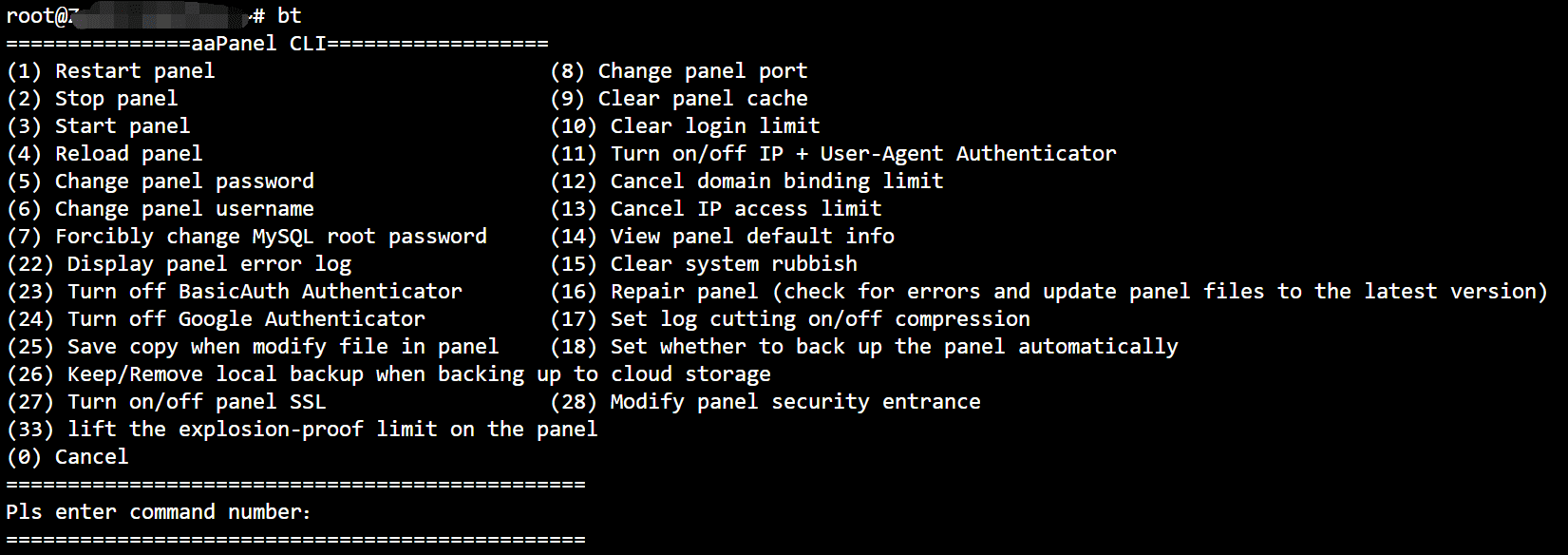
# bt
Stop
service bt stopStart
service bt startRestart
service bt restartUninstall
service bt stop && chkconfig --del bt && rm -f /etc/init.d/bt && rm -rf /www/server/panelView current port of control panel
cat /www/server/panel/data/port.plChange port of control panel,e.g. 8881(centos 6 Operation System)
echo '8881' > /www/server/panel/data/port.pl && service bt restart iptables -I INPUT -p tcp -m state --state NEW -m tcp --dport 8881 -j ACCEPT service iptables save service iptables restartChange port of control panel,e.g. 8881(centos 7 Operation System)
echo '8881' > /www/server/panel/data/port.pl && service bt restart firewall-cmd --permanent --zone=public --add-port=8881/tcp firewall-cmd --reloadForce to change MySQL manager (root) Password,e.g. 123456
cd /www/server/panel && python tools.py root 123456Change control Panel login password,e.g. 123456
cd /www/server/panel && python tools.py panel 123456Site Configuration location
/www/server/panel/vhostDelete banding domain of control panel
rm -f /www/server/panel/data/domain.confClean login restriction
rm -f /www/server/panel/data/*.loginView control panel authorization IP
cat /www/server/panel/data/limitip.confStop access restriction
rm -f /www/server/panel/data/limitip.confView permission domain
cat /www/server/panel/data/domain.confTurn off control panel SSL
rm -f /www/server/panel/data/ssl.pl && /etc/init.d/bt restartView control panel error logs
cat /tmp/panelBootView database error log
cat /www/server/data/*.errSite Configuration directory(nginx)
/www/server/panel/vhost/nginxSite Configuration directory(apache)
/www/server/panel/vhost/apacheSite default directory
/www/wwwrootDatabase backup directory
/www/backup/databaseSite backup directory
/www/backup/siteSite logs
/www/wwwlogs
/www/server/nginxStart
service nginx startStop
service nginx stopRestart
service nginx restartReload
service nginx reloadnginx Configuration
/www/server/nginx/conf/nginx.conf
/www/server/httpdStart
service httpd startStop
service httpd stopRestart
service httpd restartReload
service httpd reloadapache Configuration
/www/server/apache/conf/httpd.conf
/www/server/mysqlphpmyadmin installation directory
/www/server/phpmyadminData storage directory
/www/server/data mysqlStart
service mysqld startStop
service mysqld stopRestart
service mysqld restartReload
service mysqld reloadmysql Configuration
/etc/my.cnf
/www/server/pure-ftpdStart
service pure-ftpd startStop
service pure-ftpd stopRestart
service pure-ftpd restartftp Configuration
/www/server/pure-ftpd/etc/pure-ftpd
/www/server/phpStart(Please modify by PHP version, e.g. service php-fpm-54 start)
servicephp-fpm-{52|53|54|55|56|70|71|72|73|74|80|81} start
Stop(Please modify by PHP version, e.g. service php-fpm-54 stop)
service php-fpm-{52|53|54|55|56|70|71|72|73|74|80|81} stop
Restart(Please modify by PHP version, e.g. service php-fpm-54 restart)
service php-fpm-{52|53|54|55|56|70|71|72|73|74|80|81} restart
Reload(Please modify by PHP version, e.g. service php-fpm-54 reload)
service php-fpm-{52|53|54|55|56|70|71|72|73|74|80|81} reload
Configuration(Please modify by PHP version, e.g. /www/server/php/52/etc/php.ini)
/www/server/php/{52|53|54|55|56|70|71|72|73|74|80|81}/etc/php.ini
/www/server/redisStart
service redis startStop
service redis stopredis Configuration
/www/server/redis/redis.conf
/usr/local/memcachedStart
service memcached startStop
service memcached stopRestart
service memcached restartReload
service memcached reload